Logo Formats Explained
JPEG
Description: A commonly used format for images with rich colour detail.
Uses: Suitable for web use, social media, email signatures, and presentations.
Pros: Universal compatibility, small file size.
Cons: Lossy compression, no transparency.
PNG
Description: A raster graphic format that supports lossless data compression and transparency.
Uses: Ideal for web use, digital documents, and presentations where transparent backgrounds are needed.
Pros: Supports transparency, high quality.
Cons: Larger file size compared to JPEG.
Description: A versatile file format that preserves fonts, images, and layout.
Uses: Perfect for print materials, sharing with clients, and document exchanges.
Pros: Scalable, editable, maintains quality, universal compatibility.
Cons: Requires PDF reader software.
AI (Adobe Illustrator)
Description: A vector graphic format used for creating and editing scalable graphics.
Uses: Essential for designers working on logos, illustrations, and print layouts.
Pros: Fully editable, scalable without loss of quality.
Cons: Requires Adobe Illustrator software.
SVG
Description: A vector graphic format used for creating and editing scalable graphics.
Uses: Essential for designers working on logos, illustrations, and print layouts.
Pros: Fully editable, scalable without loss of quality.
Cons: Requires Adobe Illustrator software.
EPS
Description: A vector format used for high-quality image printing and scalable graphics.
Uses: Perfect for vendors and print materials, such as signage and marketing collateral.
Pros: Scalable, editable, retains quality.
Cons: Can be large in file size.
WebP
Description: A modern image format that provides superior compression for web images.
Uses: Optimal for web use, reducing load times without compromising quality.
Pros: Smaller file size, supports transparency.
Cons: Not universally supported by all browsers.
Who Needs Which Formats?
Clients
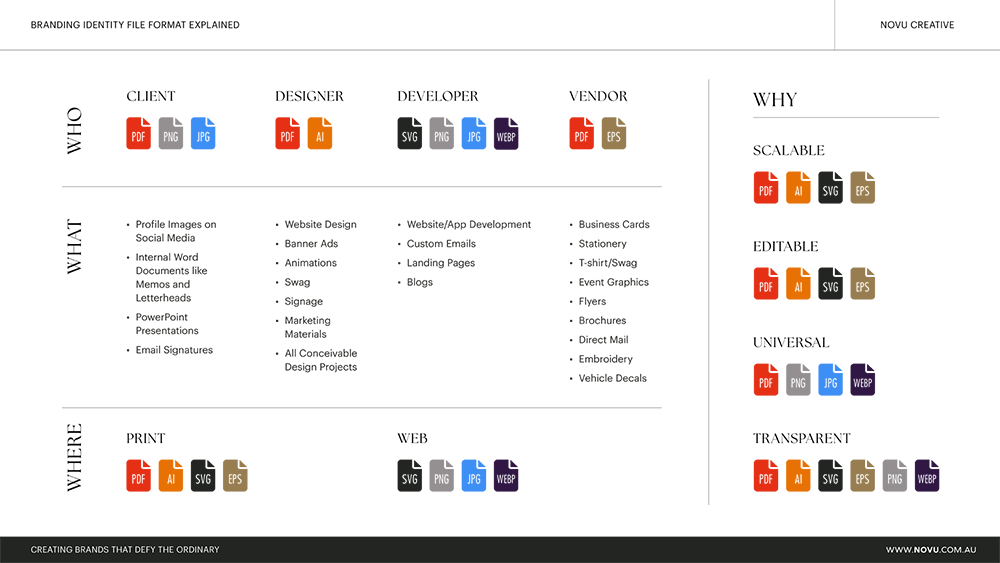
Formats: PDF, PNG, JPG
Use Cases: Sharing with stakeholders, using in digital presentations, and embedding in documents.
Designers
Formats: AI, PDF
Use Cases: Creating and editing logos, preparing print layouts, and maintaining high-quality graphics.
Developers
Formats: SVG, PNG, JPG, WebP
Use Cases: Website and app development, ensuring scalable and high-quality images for digital interfaces.
Vendors
Formats: PDF, EPS
Use Cases: Producing high-quality print materials, signage, and marketing collateral.
Where To Use Each Format

Formats: PDF, AI, EPS
Applications: Business cards, stationery, t-shirts, event graphics, flyers, brochures, direct mail, embroidery, vehicle decals.
Web
Formats: SVG, PNG, JPG, WebP
Applications: Website design, banner ads, animations, custom emails, landing pages, blogs, social media profiles.
Why These Formats Matter
Scalability
Formats: PDF, AI, SVG, EPS
Benefit: Ensures logos maintain quality at any size, from business cards to billboards.
Editability
Formats: PDF, AI, EPS, SVG
Benefit: Allows for easy modifications and updates to the logo without starting from scratch.
Universal Compatability
Formats: PDF, PNG, JPG, WebP
Benefit: Ensures logos can be opened and viewed across different platforms and software.
Transparency
Formats: PDF, AI, EPS, SVG, PNG, WebP
Benefit: Allows logos to be placed over various backgrounds without a white box or unwanted background colour.
Practical Example: Using Logos in a PDF
For a practical application, consider embedding your logo in a PDF document. This allows you to:
Maintain High Quality: Your logo retains its sharpness and detail regardless of the document’s size.
Ensure Compatibility: PDF files can be opened on almost any device or operating system.
Support Transparency: Your logo will seamlessly blend into the document’s design without background interference.

Understanding the different logo formats and their uses can significantly enhance the effectiveness of your branding efforts. At Novu Creative, we are dedicated to helping you navigate these choices to ensure your logo looks impeccable, whether it’s in a digital or physical format.
Need help with your logo formats?
Contact Novu Creative today, and let’s ensure your brand shines everywhere it appears.